


When your connection stops working, everything looks the same from where you're sitting. Here's the chain of steps your data passes through, what breaks at each one, and how to work out which link is the problem.
When your Internet connection breaks, it's easy to blame your provider.
Sometimes it's their fault, but often it's elsewhere. On a typical home or office connection, your data passes through several distinct steps before it even reaches your Internet provider, and several more after it. A problem at any point along that chain looks exactly the same from where you're sitting: nothing works.
The trouble is that the symptom doesn't tell you where the fault is — it could be a metre away, or three thousand miles away.
There's a whole chain of things sitting between you and the server or website you're trying to reach — a complexity hidden within day to day browsing.
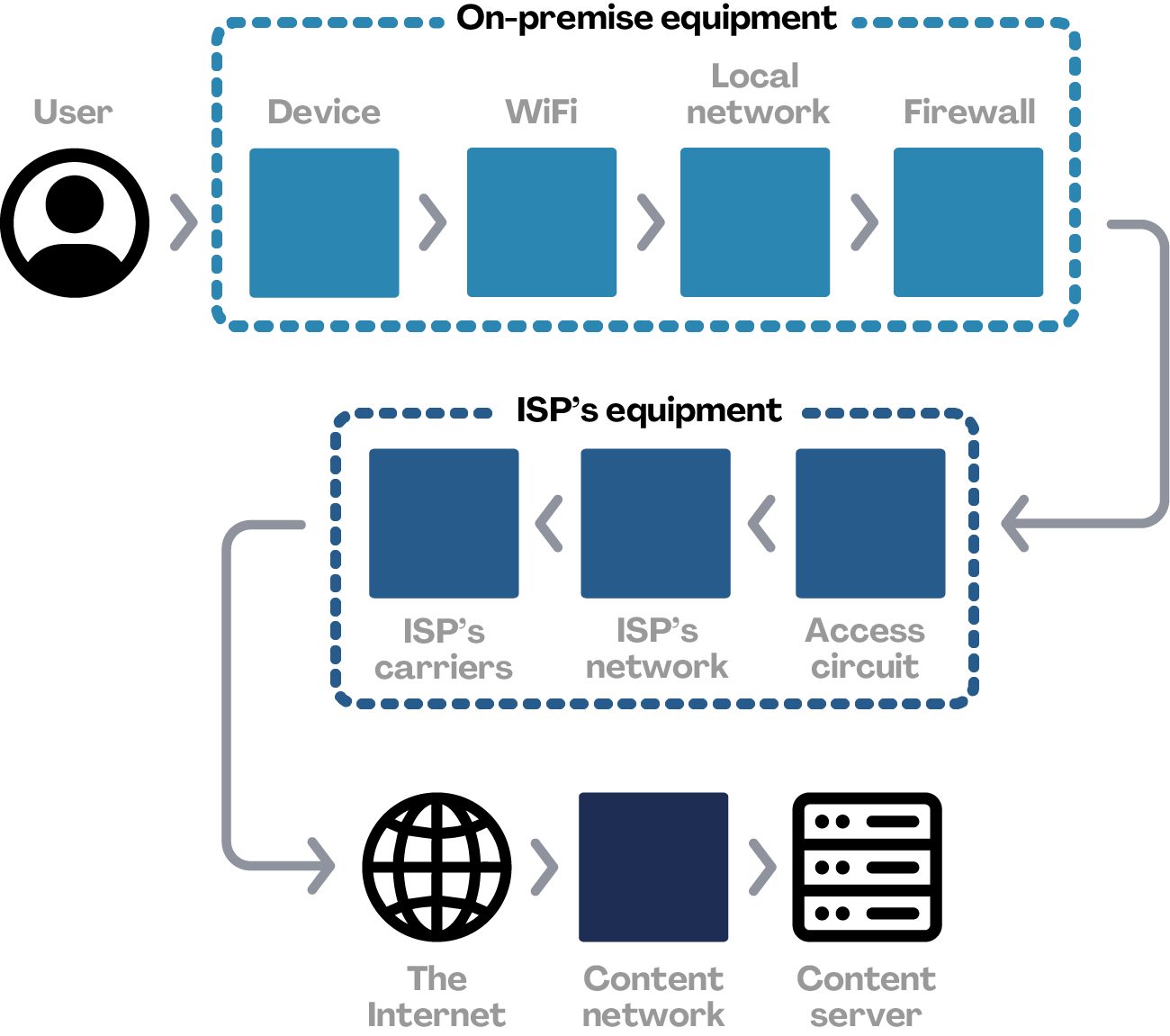
Your device. Be it a desktop PC, laptop or phone, devices have an operating system, drivers, settings and the network adapter itself, all of which could be at fault. And a device that has dropped off the network behaves much the same as if there were a problem further up the line.
WiFi. There are all sorts of things that can interfere with WiFi, causing your connection to slow or even drop entirely. It's so common we made a video about it.
The local network. From switches to cabling, or even other computers on the network misbehaving, the local network is a common culprit.
The firewall. Part of the local network too, but also the main gateway to the outside world. Firewalls are complex beasts that generally do more work than any other device in the building, and they're easily misconfigured in ways that leave your connection to the Internet broken.
The line itself (aka the access circuit). The physical wire (which is usually optical fibre, but in many places still copper) running from your premises to the street and then onward to the local exchange. Easily damaged by a digger on a local road somewhere.
Your ISP's network. Your Internet provider has their own internal network, which can develop hardware faults or become misconfigured, just as yours can. Most ISPs monitor their networks closely, and become aware of problems fast, but fixes are not always quick to resolve.
Your ISP's carriers. Your provider buys access to upstream networks, known as carriers, much the same way you buy access from your provider. The difference is scale: these are the people who lay fibre across continents rather than down local roads. A fault at this level can affect thousands, if not millions, of people — but at your desk it looks practically the same as a WiFi problem: broken Internet.
The Internet and the other end. At some point your traffic is considered to be crossing the Internet itself, but everything above applies just as much at the far end. The server you're trying to reach sits behind its own carriers, its own provider and its own local network — and of course, it might simply be the server itself that's broken.
This all describes how your data gets across the Internet, but even before that happens, your device has to look up where to send it.
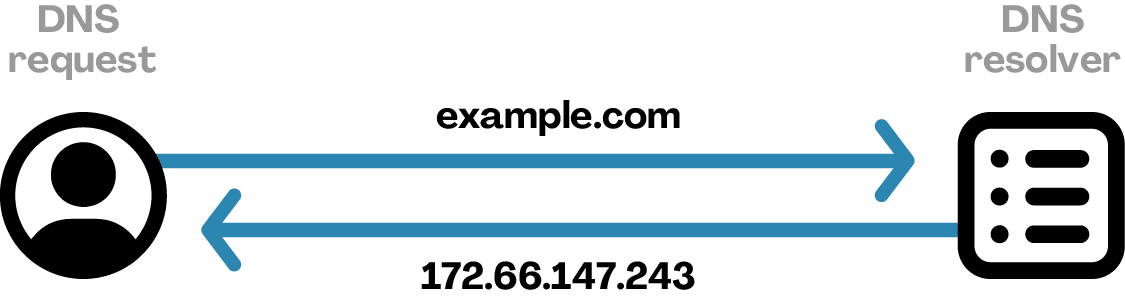
That's a process known as DNS (Domain Name System), which takes a name like 'en.link' and turns it into an IP address. It powers the entire Internet, and has its own chain of things that can break.
DNS responses can be kept locally (cached) in your browser, your operating system, your router, or even on a resolver at your provider or elsewhere on the Internet.
Caching is what makes browsing faster, but when it fails, it causes big problems. And failures on DNS servers flow downstream into all the caches closer to home eventually too.
DNS failure doesn't look much different to a broken wire, or failing wifi.
Knowing where the problem is tells you what to actually do about it.
Should you:
If you guess wrong, you could lose hours on hold to your ISP trying to solve a fault that's inside your own building, or waste an entire morning rebooting equipment while the actual problem is at some roadworks several streets away.
Pinning down the problem yourself often isn't straightforward, which is why we built an Internet connection diagnosis tool that walks you through it, step by step.
It asks simple questions, such as "Is it affecting all sites, some, or just one?", "Is it all your devices, or only one?", and "Is it affecting wired devices, wireless devices, or both?". Each answer helps you narrow down where to look next. None of it needs technical knowledge. In fact, it's the same set of questions we'd ask you on the phone.

Ten minutes using this could save you hours on hold, or even days of back-and-forth with a provider, when the fix turns out to be closer to home.
If you're technically inclined, there are some great tools you can run yourself to reveal exactly where along that path things aren't working. We've written guides for each of them:
If you've never used the command line interface (CLI) before, start with our article What is the terminal?
Intermittent faults are the often the hardest ones to diagnose. By the time someone looks into it, the problem is often gone.
To try and help solve this, we created our own diagnostic device to send to any of our clients experiencing intermittent problems. We call it the "Little Blue Box". It's a small device, designed completely in-house, that plugs into your main router and runs continuous tests in the background, catching faults in the act.
You can still diagnose intermittent faults without it, but it might take a little longer to pin them down. Running regular MTR tests can help. ThinkBroadband have a useful tool called the "Broadband Quality Monitor" which can monitor your connection to your ISP, if you suspect that's the problem.
Most of the frustration in a network fault isn't technical. It's being passed between your provider, your IT support and your hardware vendor, each of them determined to blame someone else.
As a provider, we offer an optional service called Managed by Enlink. It's our most comprehensive level of care, covering the whole path, from the Internet down to the individual device on a desk, so there's one number to call, one team responsible, and no blame shifting.
If that sounds like it might be useful to your business, get in touch now, or book a call below.

If you found this useful, subscribe on YouTube for more networking content.
For more information, visit our home page or contact us with your questions.
